This article goes through the steps needed for students to self-enroll in your course. This is most often set up for institutions that: do not yet have LMS integration with Codon Learning; are awaiting the LMS integration approval; or cannot have LMS integration with Codon Learning. If you need to reach out to your LMS administrator, please let us know and we're happy to help!
Included in this article:
- How do I set up my course so that students can self-enroll?
- How do students self-enroll in my course?
How do I set up my course so that students can self-enroll?
Your Education Support Specialist will help to set up your course so that students can self-enroll by clicking on a unique link. Your ESS will share that unique link for your course as well as onboarding materials to share with students (including first-day slide deck and message to students).
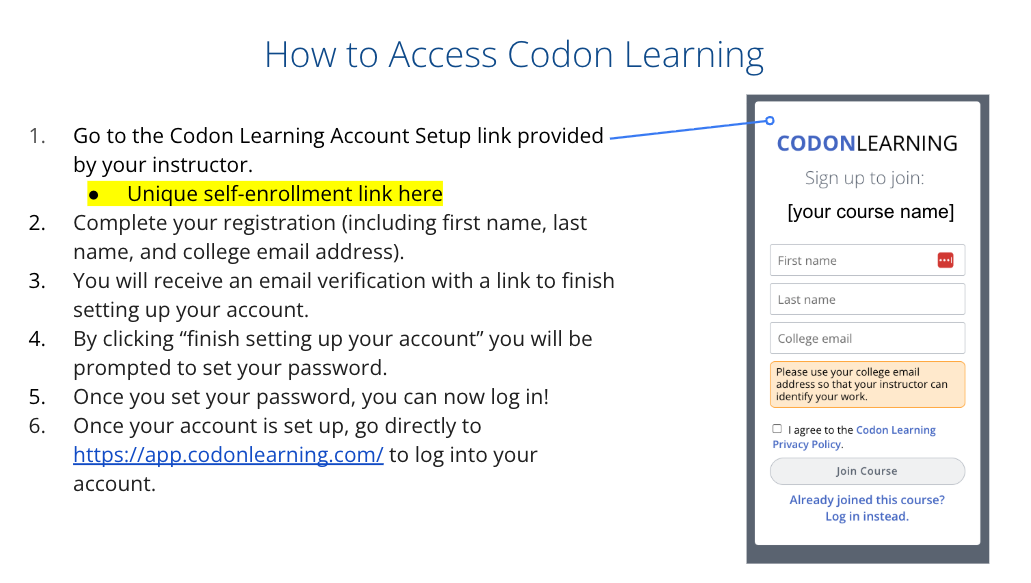
Once you have the unique link for self-enrollment, you can add it to the onboarding materials and share it with students.
How do students self-enroll in my course?
- Students will go to the unique Codon Learning Account Setup link provided by your ESS.
- Students complete the registration (including first name, last name, and college email address).
- Students will receive an email verification with a link to finish setting up their account. If a student already has an account with Codon Learning, they can simply use the link to log into their account.
- By clicking “finish setting up your account” students will be prompted to set a password.
- Once they set a password, they can now log in.
- Once their account is set up, they can log into their account at https://app.codonlearning.com/
If your students have any questions, they can use the Support Page to submit a ticket or email us at support@codonlearning.com.
Was this article helpful?
That’s Great!
Thank you for your feedback
Sorry! We couldn't be helpful
Thank you for your feedback
Feedback sent
We appreciate your effort and will try to fix the article