This article applies to courses participating in the Fall 2026 Personalized Feedback beta. If you don't see the features described here, your course may not have AI feedback enabled.What is Personalized Feedback?
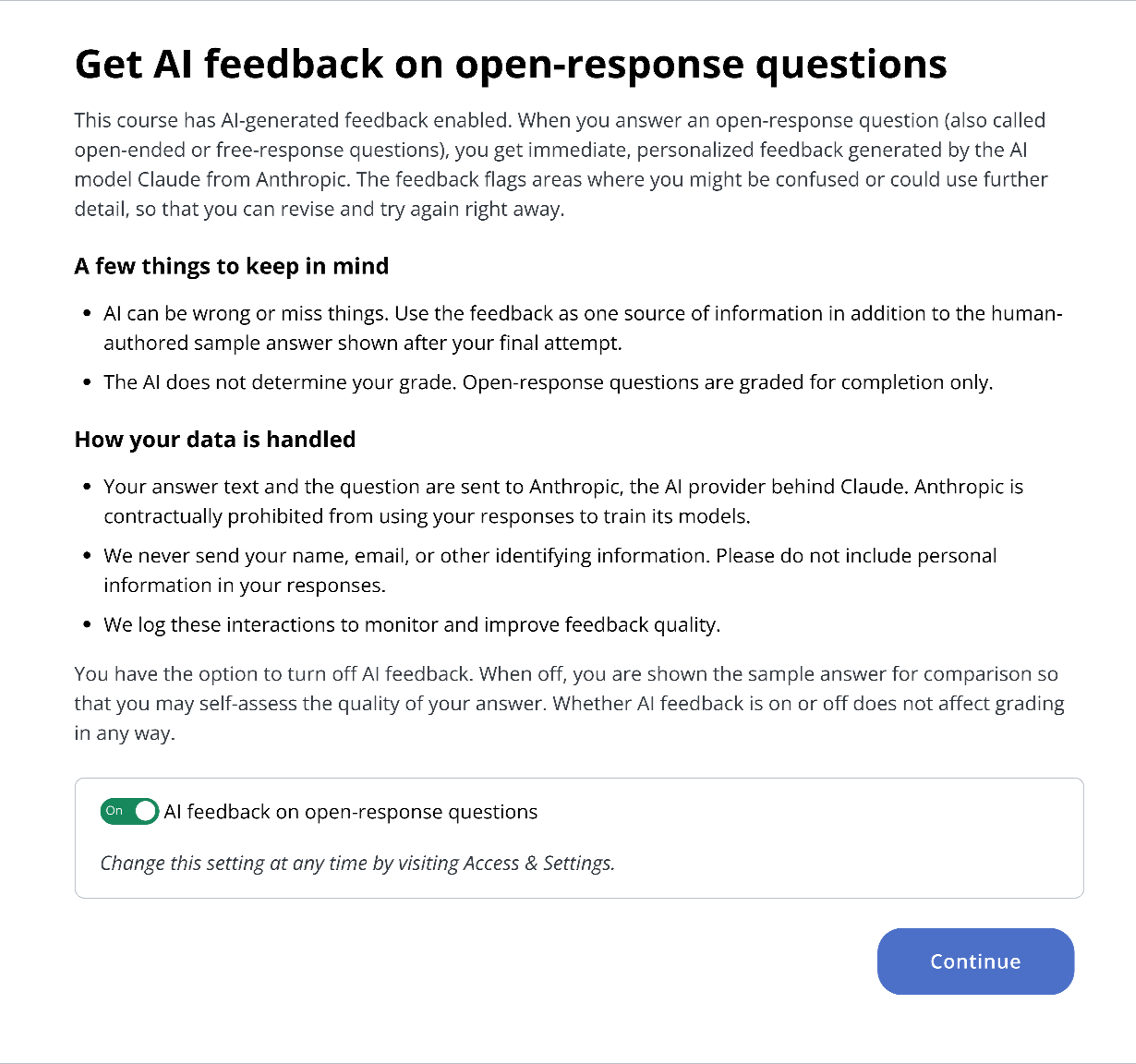
Codon offers AI-generated feedback for open-response questions (also called open-ended or free-response questions). When you submit an answer, you get immediate feedback that is personalized to what you wrote. Feedback is generated by Claude, an AI from Anthropic. The feedback flags areas where you might be confused or could use further detail, without giving away the answer, so you can revise and try again right away.
The first time you log in after the feature is turned on in your course, you'll see a message introducing it, and you can choose whether to use it. You can change your mind at any time (see "Turning AI feedback off or on" below).
How it works
Open an assignment as usual. AI feedback is available on open-response questions in any assignment type — Readings, Pre-Class, Homework, Prep Questions, and Practice Tests. (Survey-style questions never receive feedback, AI or otherwise.)
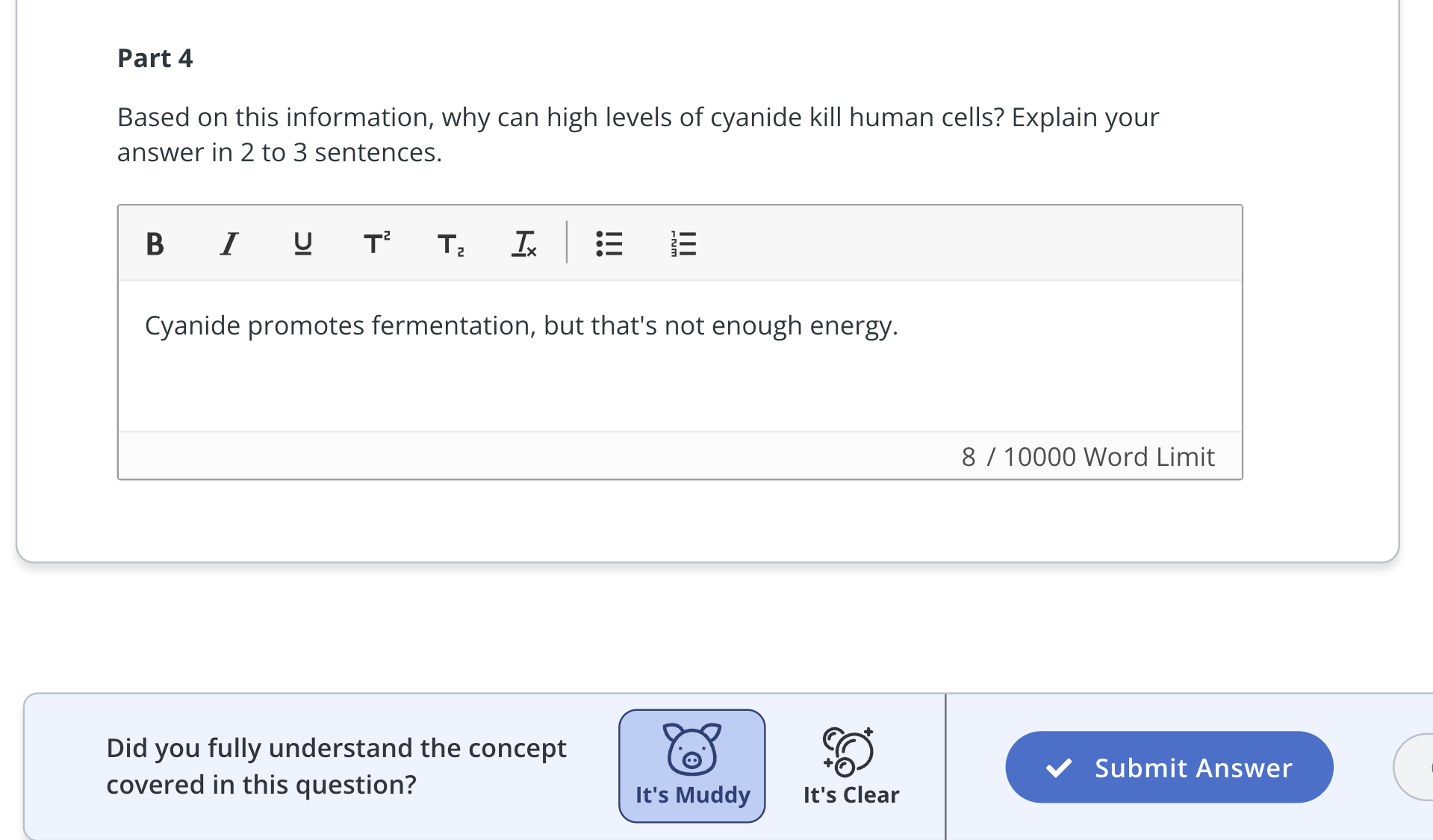
Type your answer in the response box, select Muddy or Clear, and click Submit. For multi-part questions, every part needs an answer before you can submit.
Your feedback appears below your answer a few moments later.
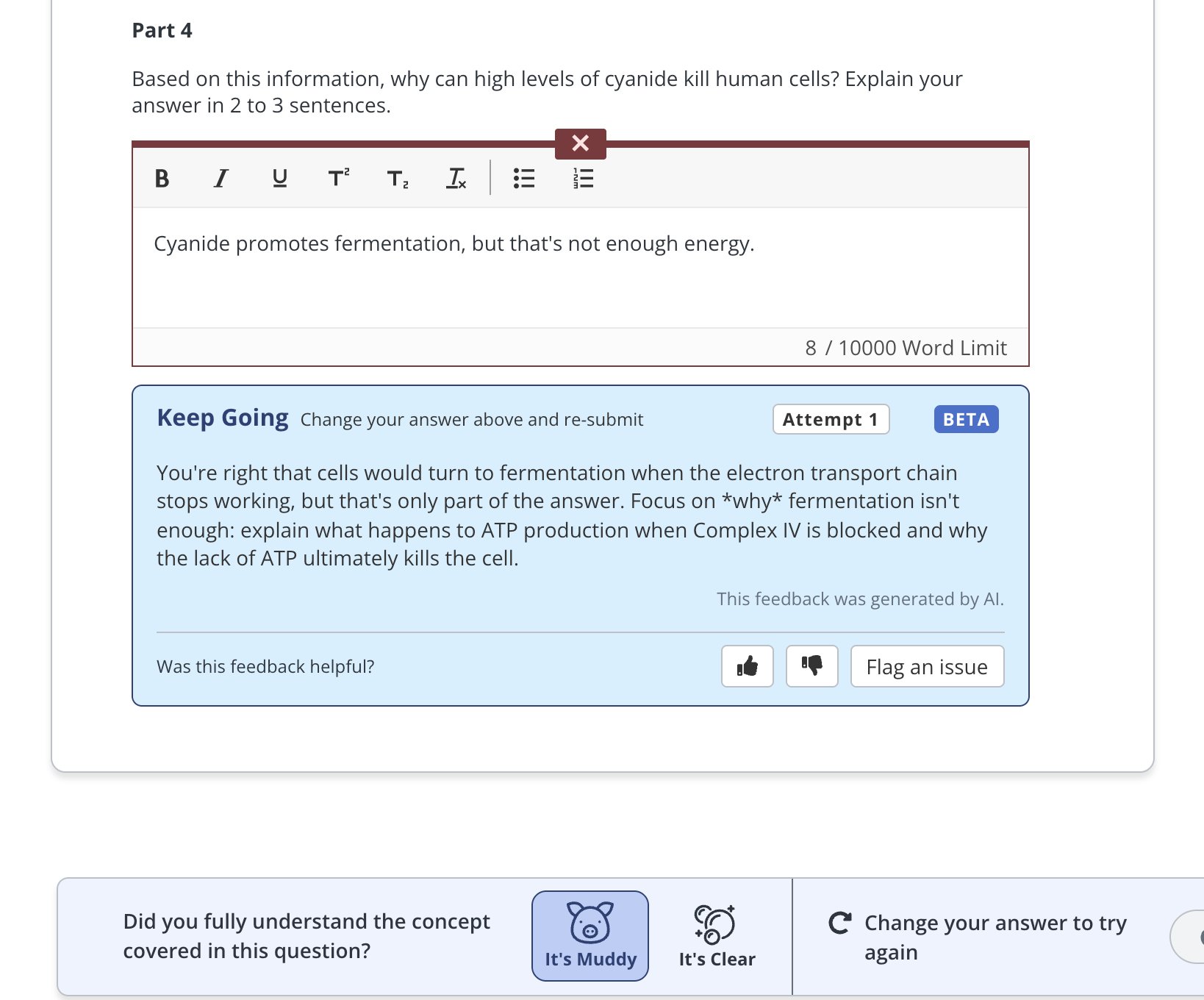
You earn full points on any open-response question just for attempting. However, if you receive a “Keep Going” or “Needs Work”, we encourage you to use the feedback to figure out what to add, clarify, or reconsider. Edit your response directly in the same textbox and click Submit again.
What the feedback categories mean
Along with written feedback, your response is placed in one of three categories:
Needs Work — your response is missing, off track, or doesn't yet engage with the question. Use the feedback to build a real attempt.
Keep Going — you're on the right track but there's room to add detail or correct a misunderstanding.
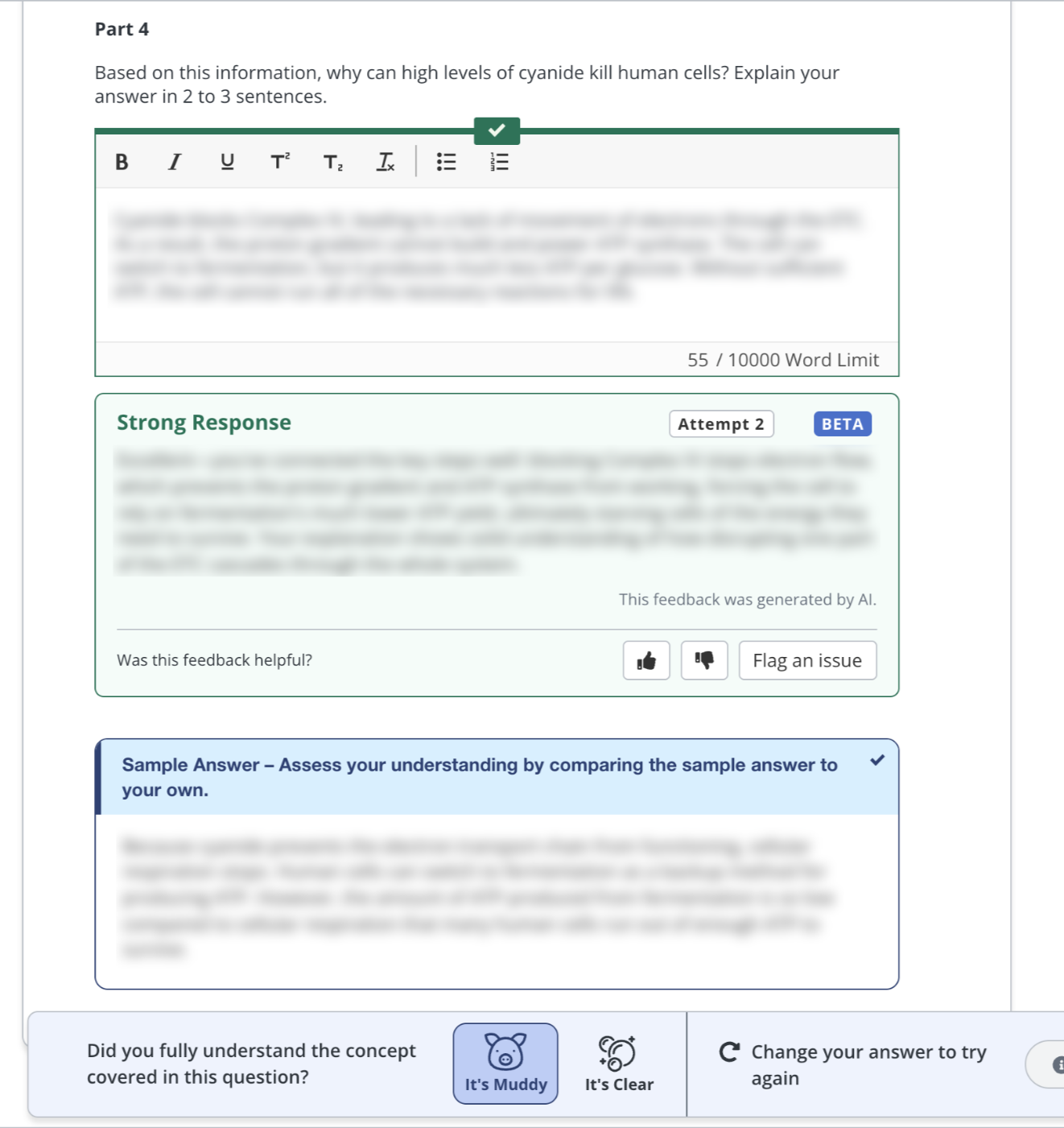
Strong Response — your response demonstrates solid understanding. Nice work!
Reviewing the Sample Answer
You'll see the human-authored Sample Answer once:
- your answer reaches Strong Response
- or after your fourth attempt
Compare it to what you wrote, note any gaps, and move on. In the event that the AI feedback and Sample Answer disagree, the human-authored Sample Answer should be treated as the source of truth.
Does the AI affect my grade?
No. The AI does not determine your grade. Open-response questions are graded for completion only, exactly as they are when AI feedback is turned off. Using the feedback or turning it off entirely has no effect on your score.
Rating and flagging feedback
Below each piece of feedback you'll see a thumbs up, thumbs down, and flag icon.
Give a thumbs up or thumbs down to tell us whether the feedback was helpful.
Use the flag if something seems wrong, confusing, or inappropriate. Flagged feedback is reviewed by humans on the Codon team.
This is a new feature, and your ratings directly shape how we improve it!

Turning AI feedback off or on
You don't have to use AI feedback. You can turn it off, or back on, at any time from your settings.
When AI feedback is off, you're shown the Sample Answer immediately after you submit, so you can self-assess your response by comparison. This is the same behavior as Codon courses that aren't using AI feedback. Whether AI feedback is on or off does not affect grading in any way.
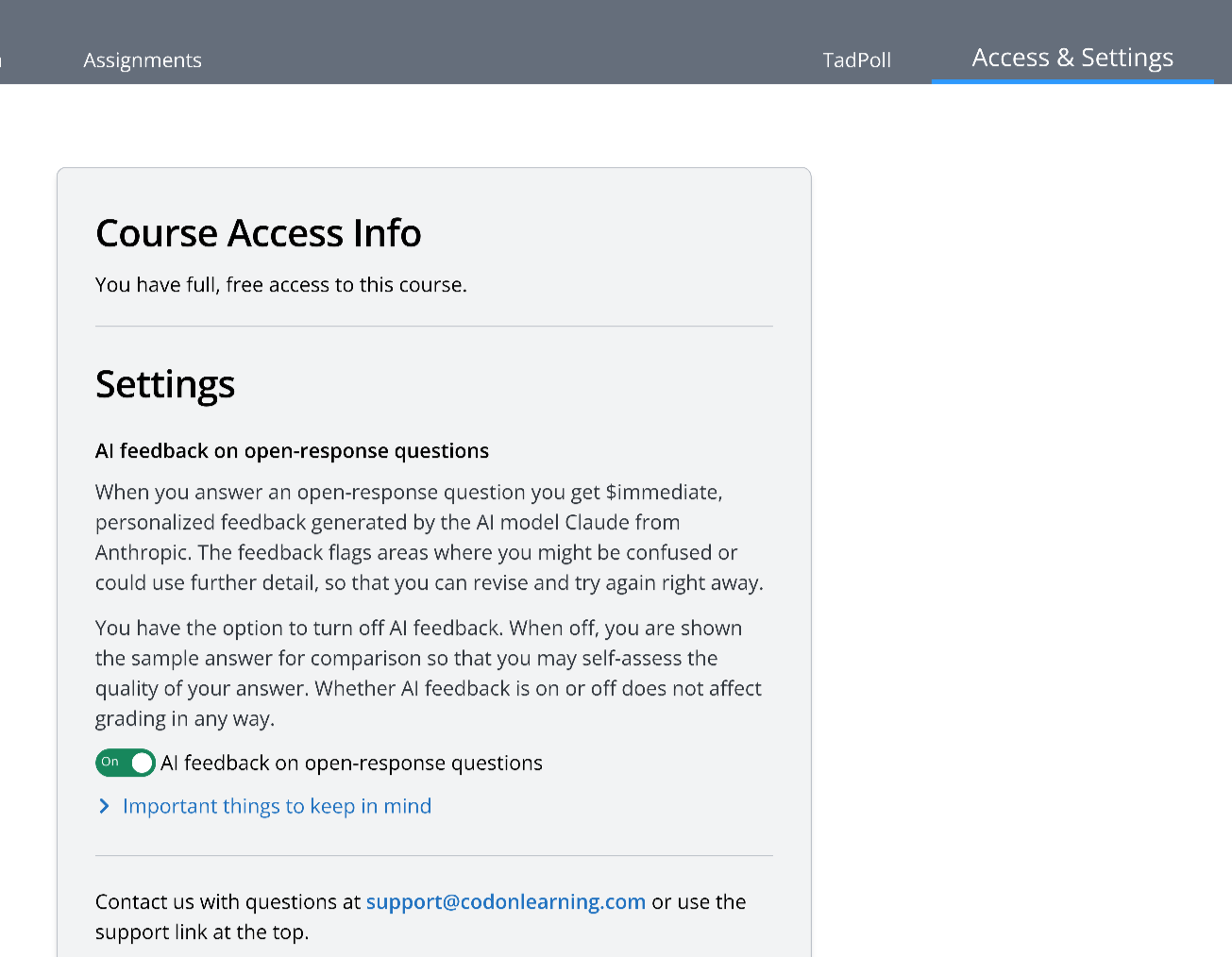
How your data is handled
Your answer text and the question are sent to Anthropic, the AI provider behind Claude. Anthropic is contractually prohibited from using your responses to train its models.
We never send your name, email, or other identifying information. Please do not include personal information in your responses.
We log these interactions to monitor and improve feedback quality.
Tips for getting the most out of it
Give it your honest best attempt first. The feedback is only as useful as the thinking you put in. A real attempt gets you feedback about your understanding that you can use to improve before you have to take a test.
Revise, revise, revise. You get the most learning benefit from working through the feedback and trying again, rather than rushing to a fourth attempt to see the Sample Answer.
Remember AI can be wrong or miss things. Treat the feedback as one source of information alongside the Sample Answer, your course materials, and your instructor.
Flag the feedback if something looks off. We actively investigate every report.
FAQ
Why don't I see feedback on some questions? AI feedback applies to open-response questions on assessment-style assignments. Survey-style questions don't receive feedback of any kind. Codon may also disable AI feedback on specific questions that we find don’t receive consistently good feedback, while we investigate solutions. In that case you'll simply see the Sample Answer.
Is the AI grading me? No. Open-response questions remain graded for completion only. The feedback exists just to help you learn!
Does it cost anything? No. There is no additional cost to students for the beta.
What if the feedback seems wrong? AI can make mistakes. Flag the feedback (this sends it to a human for review) and check the Sample Answer once it's available. If you're still unsure, ask your instructor.
Can my instructor see my answers and the AI feedback? Your instructor can see your first two responses to any question, the same as in every Codon course. The AI feedback itself is not currently visible to instructors, though we log it and can share it with them on request during the beta.
Who do I contact with problems? Email us at support@codonlearning.com. For questions about course content, ask your instructor.
Was this article helpful?
That’s Great!
Thank you for your feedback
Sorry! We couldn't be helpful
Thank you for your feedback
Feedback sent
We appreciate your effort and will try to fix the article